Existing Map Data Online Fast, Then Maintainable and Reusable
Three things at once: map data goes online without redrawing, records stay attached once it is live, and the same viewer moves on to the next venue
Existing Map Data Goes Online Directly
As-built DWG, vector PDF, even a single JPG guide map can go in. No redrawing, no AI-generated images, and the original drawing is kept for checking.
Learn about onboarding map dataMaintainable Space Data
Every room and piece of equipment has a stable ID. Once handover inspection, maintenance work orders and annual inspection records are attached, they survive a rebuild of the map data.
Learn about maintainabilityA Reusable Viewer
One set of space data produces 2D plans, 3D massing and the IMDF standard format at the same time, and the viewer front end carries over as a whole to the next project.
Learn about reusabilityExisting Map Data Goes Online Directly
At most venues the problem is not a lack of drawings, but drawings that will not open, cannot be read and cannot be moved. As-built CAD routinely runs to hundreds of megabytes, and only the engineering department's machines can run the software; operations, property management and the management committee usually end up with nothing but a PDF. Our approach is to read the existing map data directly and extract space boundaries, room numbers and equipment into structured data that opens in a browser.
Accepted Inputs
- As-built DWG/DXF: layers, text and blocks are read directly, including large composite drawings of tens of MB and hundreds of thousands of entities
- Vector PDF and flat-color guide maps in JPG/PNG: space boundaries are extracted from color areas and lines, with no AI regeneration of the floor plan
- Interpretation stays traceable to the original drawing: every space can be checked against its position in the original, and is marked as read directly or inferred
Actual Cases
- Residential floor plan CAD (three bedrooms plus a study): a DWG with 7,832 entities, 50,302 vector paths extracted, resolved into 14 spaces and 23 furniture and equipment volumes
- Small apartment CAD (two bedrooms): 2,084 entities, 6 spaces and 14 furniture volumes; the original fill covered only part of the exterior walls, so 8 partition segments were reconstructed from paired wall lines with their source IDs preserved
- Both started from a DWG in an archive file and reached clickable 2D and 3D in a browser the same evening
Where It Fits
- Property developers: common areas and unit plans go online before handover, with inspection and defect records marked directly on the spaces
- Public venues: existing floors are digitized, so leasing, wayfinding and operations share one map
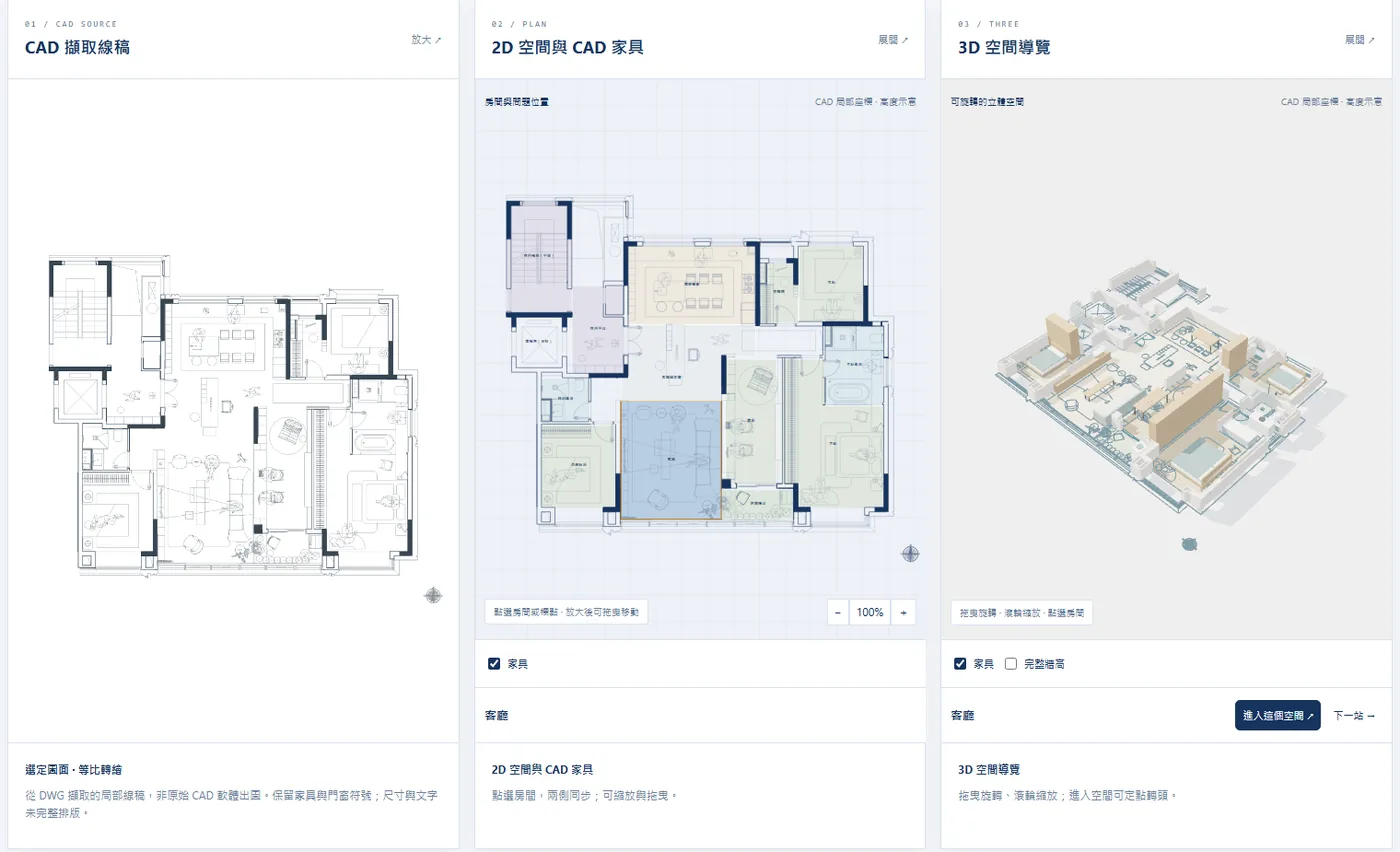
Residential floor plan CAD (three bedrooms plus a study): linework extracted from the DWG, clickable 2D spaces and 3D space navigation side by side. Selecting any room syncs all three.
Maintainable Space Data
Going live is only the start. After a developer hands over, the management committee takes over, and venues have maintenance and inspections every year. If a space ID changes each time the drawing is rebuilt, every record attached to it is void and the viewer falls back to being a nice-looking picture. We treat ID stability as an acceptance condition, not an incidental feature.
Technical Features
- Deterministic space IDs: rebuild from the same CAD and room and equipment IDs stay the same
- Records stay attached: after a map data rebuild, records previously attached to a space still resolve to that space
- Traceable sources: every wall segment and space keeps its CAD source ID, and manually reconstructed parts are marked separately rather than drawn back into the original
- Automated acceptance gates plus sampled manual checks: the part that cannot be automated is deliberately left to people
- Map revisions can be compared: which spaces were added, removed or renamed is set out in a single difference list
What a Record Can Be
- Handover inspection defects and re-inspection
- Maintenance work orders for common-area equipment
- Annual venue inspections and fire-safety checks
- Tenants and leasing status
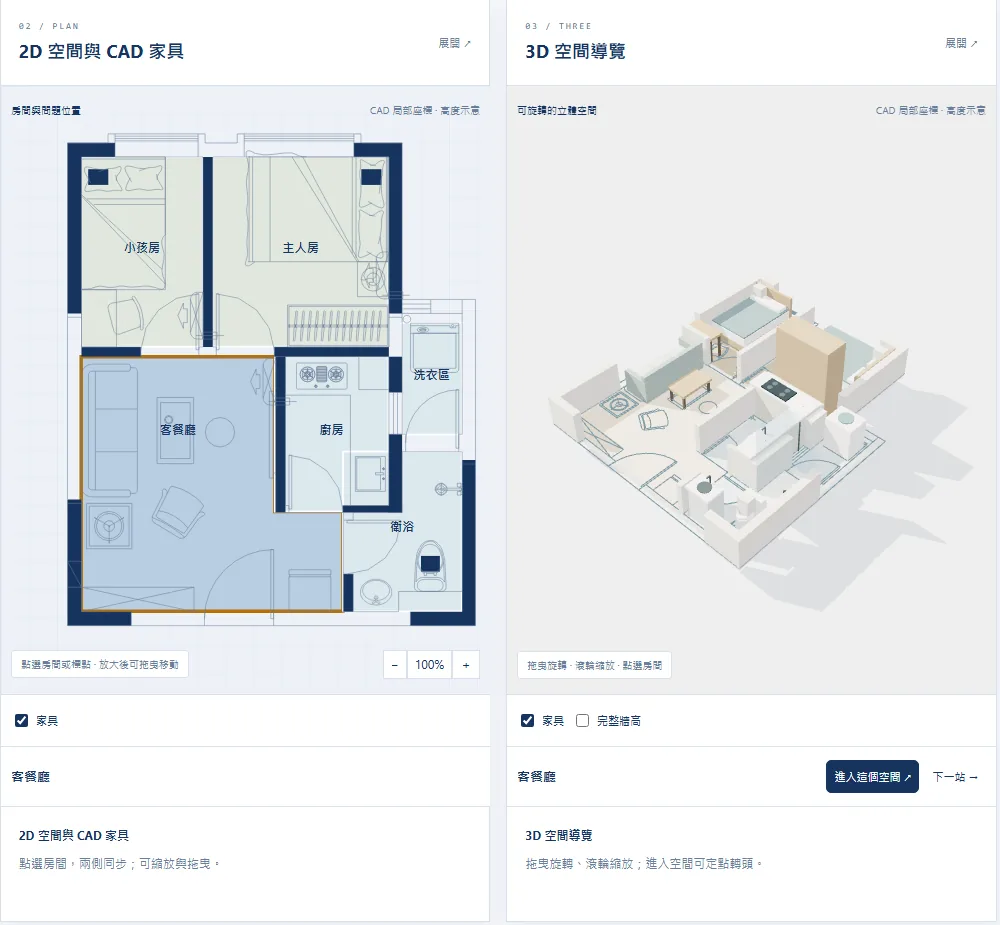
Small apartment CAD (two bedrooms): every room has a name and an ID, 2D and 3D point to the same space, and selecting on one side moves the other to match. Manually reconstructed partitions are marked separately from those taken from the original drawing.
A Reusable Viewer
One traced data set is the single source of truth: 2D plans, 3D massing and the IMDF standard format all come from it, and a change in one place syncs all three. The viewer front end is a portable bundle of web components, so a new venue means new data, not a rebuilt map. Once a developer has done the first project, the second is a matter of applying it; once a venue has done the departures level, arrivals follows the same process.
Technical Features
- The 2D, 3D and IMDF outputs share one source, so three drawings never contradict each other
- Two residential CAD files have actually been exported to IMDF: 14 and 6 space units, with walls and furniture each as separate fixtures, and zero format validation errors; space IDs are determined by source IDs and do not change on a rerun
- Viewed directly in desktop and mobile browsers: no app, no CAD, no 3D modeling software
- The IMDF output conforms to the Apple and Google indoor map formats and connects directly to our IMDF Map Production and IMDF Map Hosting services
- When viewing has to be restricted, it can be encrypted and put on static hosting, unlocked only with a key and not indexed by search engines
Where It Fits
- Developers reusing across projects: the same viewer components, with only the map data changing per project
- Chains and multi-site venues: one format for cross-site comparison and management
- Leasing and presentation: 3D space views alongside 2D floor plans, with external explanations drawing on the same data
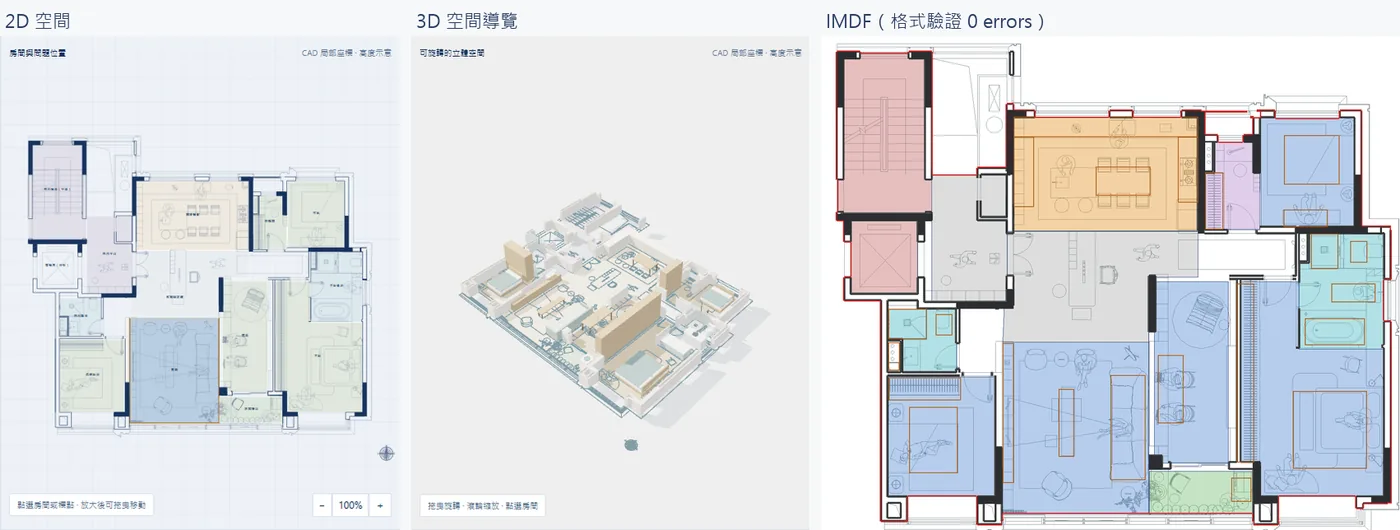
Residential floor plan CAD (three bedrooms plus a study): 2D spaces, 3D space navigation and IMDF produced from one set of space data. The IMDF validates against the Apple format with 0 errors, rooms map to official categories such as room, kitchen, restroom and walkway, and walls and furniture are fixtures.
The Boundaries of "Lightweight"
This viewer is for operations, handover and management, not BIM for engineering delivery. Setting the boundaries out first keeps a gap from surfacing in the first meeting
Included
- Structured data for levels, rooms, corridors, openings and amenities, with stable IDs
- A 2D plan viewer, 3D massing views and IMDF standard format output
- Every space can carry records, be checked against the original drawing and be compared across versions
- Interpretation status is labeled: read directly, inferred and unknown are kept apart
Not Included
- Full-LOD engineering models and construction-grade geometry such as IFC and Revit, assessed separately when needed
- Without on-site measurement we do not provide measured values such as area or floor space; scale follows the units declared on the drawing
- 3D furniture and equipment are category placeholders and do not represent actual appearance or dimensions
- Uses that need centimeter-level accuracy, such as navigation and robotics, require a site survey or scan calibration; we have a separate process for that
How to Start
Look at one floor first, then decide. The first step needs only what you already have
1. Send your existing map data
DWG, DXF, PDF or an image of a floor plan all work, with no tidying up needed.
2. Map data inventory report
We report back what each drawing can support, what needs manual interpretation, and whether units and scale are in doubt.
3. First floor live and accepted
Delivery goes one floor at a time, expanding only after automated gates and sampled manual checks pass.
4. Handover or hosting
The map data and viewer can be handed over as a whole to the management committee or the operating team, or hosted by us on a monthly subscription.
Have as-built CAD or a floor plan and want to see one floor first?
Send us one set of map data and we will come back with an inventory report and what is feasible, then you decide whether to go further
Get in Touch